Chatter for SharePoint 1.7 Update

Hi Everyone. Wanted to provide another status report on the version 1.7 progress. All three editions are now complete and going through extensive testing. More than 50% of the code has been updated in this version so it requires a little more testing than normal. I spent a lot of time optimizing the code, improving performance where I could and squashed a number of bugs along the way. Here is the final change log:

1.7.0.0

  • Added support for Chatter API version 28.0
  • Added initial support for Topics
  • Added the ability to set a default topic or hash tag for the web part
  • Added Post To control to target posting of content to followers or group
  • Added Find on Chatter ribbon option to allow for searching of SharePoint content on Chatter
  • Added support for viewing attachments in comments
  • Fixed issue where web part would hang following authentication
  • Fixed issue where web part could get stuck in a refresh loop if unable to write settings to web.config
  • Fixed issue where sites without the Ribbon could not authorize clients due to missing sp.js reference
  • Removed ‘Fast Load for Cached Content’ setting in web part properties panel
  • Improved Share on Chatter functionality
    • Post to group from web part and ribbon
    • Post files to group from web part and ribbon
    • Upload files from SharePoint document libraries to Chatter
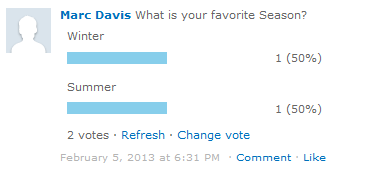
  • Improved formatting of Polls
  • Improved performance of web part load times
  • Improved debug messages

Looking to release the new version the week of July 22nd. Thanks for everyone’s input and patience – and thanks for using Chatter for SharePoint!
On Deck: Chatter for SharePoint 1.7

Hi Everyone – Work continues on the next version of Chatter for SharePoint. We’re still a few weeks out from the release but I wanted to share my current progress.

  • Improved Share to Group functionality

    I’m pleased to report that Version 1.7 will have equivalent Share to Group functionality as compared to the native Chatter experience.

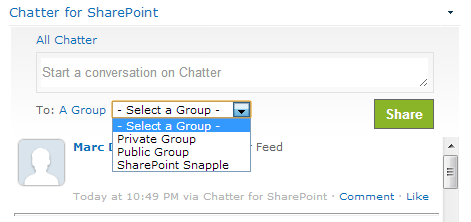
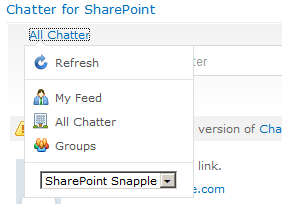
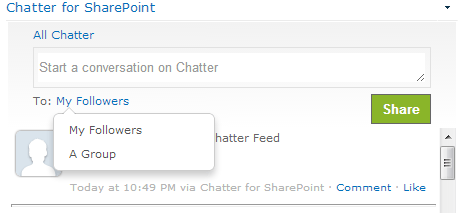
    The ‘Share on SharePoint’ control has been moved into the feed menu to make room for the Post-To control. Clicking the control will open a dropdown:

    Selecting ‘A Group’ will load and cache the user’s available groups:

    The post will be targeted for the selected group.

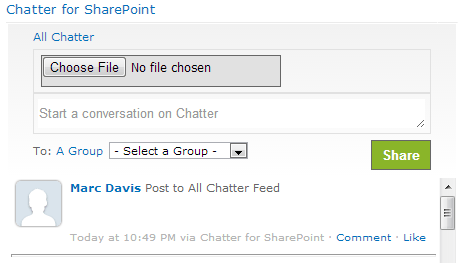
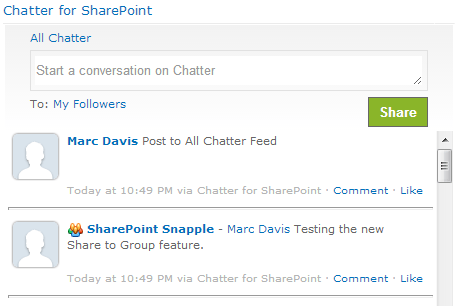
    The File Upload control (when selected) has been relocated to above the conversation box, also similar to the native Chatter experience:

    The branding and chrome of the web part has been updated to also be closer to the native experience. The Share to Group functionality will also extend to sharing items/documents on Chatter.

  • Find on Chatter

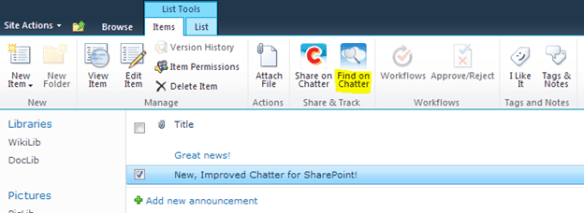
    Also in 1.7 is the ability to find selected SharePoint objects (List Items, Document, etc) that have been shared on Chatter by using the new Find on Chatter ribbon button.

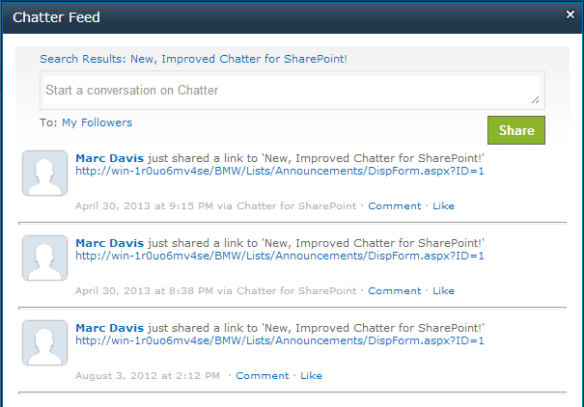
    The option will appear for compatible items in the ‘Share & Track’ ribbon group. Clicking it will perform a search against Chatter and display relevant results:

    Still have some cleanup to do and then porting the changes to 2007/2013. Look for more updates in the days ahead. Thanks to everyone for the suggestions and feedback!

Chatter for SharePoint and SalesForce Summer 13

Hi Everyone – It has come to my attention that the Summer 13 release which is being pushed out later this month has a number of updates regarding Remote Access – specifically that they have been converted to Connected Applications. I am in the process of testing Summer 13 now and making minor modifications to support it going forward.

For the most part, Chatter for SharePoint versions 1.6.0.1 and earlier will work with Connected Applications, provided that the following two OAuth Scopes are set in the profile: ‘Access and manage your Chatter feed (chatter_api)’ and ‘Perform requests on your behalf at any time (refresh_token)’. If after upgrading to Summer 13 you find the Chatter for SharePoint solution has stopped working check your OAuth settings on SalesForce and make sure these two scopes are selected.

Additionally – SalesForce changed some of the JSON being returned which is causing user photos to not be shown (it shows the default blank person image). I am updating and retesting Chatter for SharePoint to handle the differences. Version 1.6.0.2 and later will support Summer 13.

Look for the updated bits shortly here on the blog. Thanks!

UPDATE: Version 1.6.0.2 is now available.

Chatter for SharePoint Version 1.6 Released!

Hi everyone. Version 1.6 of the Chatter for SharePoint solution is now available on the blog. You can download the files for your version of SharePoint from this link.

This version includes support for uploading files to SalesForce Chatter from the web part as well as from within SharePoint Document libraries. The version also includes minor fixes and code improvements.

The Share to Group, Photo Sync and localization support are still on the backlog for a future release.

On Deck: Chatter for SharePoint 1.6

Hi Everyone – sorry it’s been awhile between posts. March was a busy month which culminated in a new job working for Automotive Resources International (ARI). Don’t worry – I’ll still be bringing you new blog posts and updates to the solutions here – especially Chatter for SharePoint.

Planning and development of version 1.6 is well underway. While the final list of new features and fixes is still to be determined, I can share what is on the drawing board.

  • File upload to SalesForce
    You’ve asked for it (I pushed back, lol) but I finally relented. Included in version 1.6 will be the ability to upload files to SalesForce Chatter from the web part.
  • Share to Group Improvements
    Looking to improve the Share to Group functionality so it is closer to the native Chatter experience
  • Photo Sync
    This one is a big MAYBE. Thinking about adding a timer-job to (optionally) sync user photos from the User Profile Service to SalesForce Chatter.
  • Multiple Language Support
    This one is also in the MAYBE category. I started the work back in 1.4 but it never got finished due to other priorities. I know a lot of you have asked for it – I am trying to fit it in.

Probably will be a lot more added to that list before 1.6 is finalized. Not seeing a feature you need? Better let me know soon so I can consider it for inclusion in 1.6. Keep that feedback coming! Thanks.

Chatter for SharePoint Version 1.5 Released!

Hi everyone. The new version of Chatter for SharePoint is now available on the blog. You can download the files for your version of SharePoint from this link.

New and updated features in this version include:

  • Added ‘Load more posts’ option to the bottom of feed to fetch next X number of feed-items into the web part
  • Added support for callback URLs to provide a better and faster authentication experience (your web applications need to be SSL for this to work; the forms authentication method is still present for non-SSL sites)
  • Added ‘Following’ filter to show all feed items from users and groups you are following
  • Added ‘Bookmarked’ filter to show all feed items you have bookmarked
  • Added support for bookmarking items from within the web part
  • Added ability to post to group when in the group feed
  • The group dropdown is now trimmed to show only groups to which you are a member
  • Fixed issue with hash tags and searching
  • Fixed Alpha filter error on Chrome
  • Fixed spelling error for Unliked link
  • Fixed issue where the ‘Also Share on SharePoint’ option was not working properly (2013)
  • Fixed issue where share box panel would not expand on the ChatterFeed form (2007)
  • Hash tags are now searchable within the web part. Just click on a hash tag within a feed item to search for all instances of the tag
  • Updated mouse-over event for bookmark/delete functionality to be on the item rather than the right-corner
  • HTTP timeout values adjusted to 30 seconds
  • New and updated debug information in the logs

Please download the latest version of the documentation for descriptions on the new features.

On Deck: Chatter for SharePoint 1.5

Good evening (or whatever time of day it is where you are) and welcome back to SharePoint Snapple. Another week – another new version of Chatter for SharePoint is getting ready to be released. You guys keep asking for features and I’m happy to deliver. Here is what we have coming up in 1.5:

  • Added ‘Load more posts’ option to the bottom of feed to fetch next X number of feed-items into the web part
  • Added support for callback URLs to provide a better and faster authentication experience (your web applications need to be SSL for this to work; the forms authentication method is still present for non-SSL sites)
  • The group dropdown is now trimmed to show only groups to which you are a member
  • Fixed issue with hash tags and searching
  • Hash tags are now searchable within the web part. Just click on a hash tag within a feed item to search for all instances of the tag
  • New ‘Following’ filter to show all feed items from users and groups you are following
  • New ‘Bookmarked’ filter to show all feed items you have bookmarked
  • Added support for bookmarking items from within the web part
  • Updated mouseover event for bookmark/delete functionality to be on the item rather than the right-corner
  • Fixed Alpha filter error on Chrome
  • HTTP timeout values adjusted to 30 seconds
  • New and updated debug information in the logs

Some screenshots:

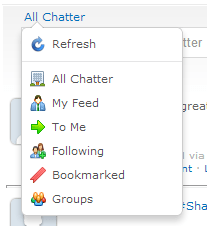
Above: Navigation showing the new ‘Following’ and ‘Bookmarked’ filters

Above: Bookmarked items and the add bookmark control (on mouseover)

Above: Searching for hash tags within the web part

Still a few more things to fit in before I close up development on 1.5. Expect to see it on the blog in the next 2 weeks. Thanks for all the suggestions!

Chatter for SharePoint Version 1.4 Released!

Hi everyone. The new version of Chatter for SharePoint is now available on the blog. You can download the files for your version of SharePoint from this link.

New and updated features in this version include:

  • Added ability to delete posts and comments from the feed web part
  • Added poll support
  • Added new feed navigation
  • Added new feed filters
  • Added file attachment doctype icons
  • Added ‘Share from Anywhere’ control
  • Fixed issue where under certain conditions the web part would cause a loop while trying to write the license key to the web.config file
  • Fixed issue where under certain conditions users would see an Access Denied message when the solution opened a modal window
  • Many internal code improvements; new css; new and updated images

Please download the latest version of the documentation for descriptions on the new features.

Chatter for SharePoint 1.4 – More New Features

Good evening everyone. I wanted to share with you the latest new features and some additional screenshots of the Chatter for SharePoint solution. Version 1.4 is shaping up to be one of the most significant updates to-date. I was just about finished with the scheduled updates for this version when an idea came to me in the shower (seriously. I have a lot of my ‘eureka’ moments in the shower for some reason).

As useful as the web part is – it’s still just a web part on a page. If you’re not on the page with the web part, you can’t use it. Since the purpose of this solution is to provide integration points from SharePoint to Chatter, I’ve come up with a new one: a way for the feed to be accessible from any page without any additional configuration. I’ve achieved this with the addition of a custom web part page and a custom action in the user-control:

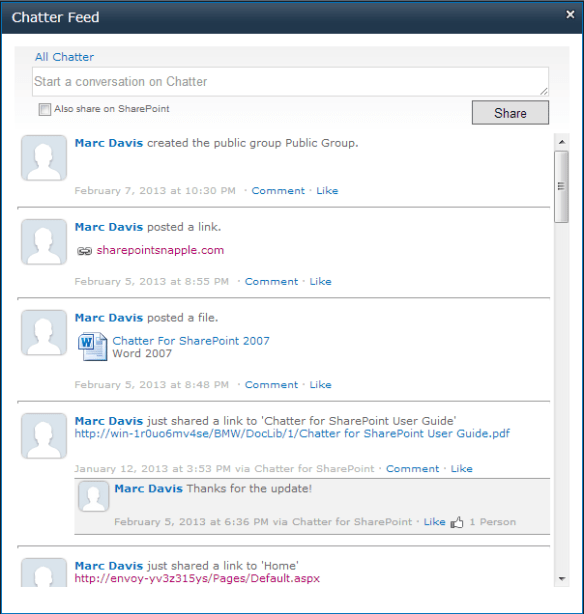
Users can now click on the user-control at the top of the page and choose ‘Chatter Feed’ to instantly collaborate on Chatter:

A new modal window will appear with the Chatter Feed web part. This integration will allow for even greater collaboration as it doesn’t require users to be on a given page to view or post to their feeds.

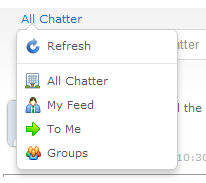
In addition to the new Chatter Feed action, I’ve also added a new feed filter to the navigation: ‘To Me’. This filter will show feed items that are targeted to you.

Also squashed a number of bugs, including one big one where under certain conditions users would get an Access Denied message when opening the modal windows from the ribbon if they did not have read permissions on the root site.

I am hoping to have the new version ready by the end of the week – if time permits.

Thanks for all of the feedback!

Coming Soon! Chatter for SharePoint 1.4

Hi everyone. Wanted to share some details and screenshots of the upcoming release of Chatter for SharePoint. The release date is still to be finalized – depends on what else I think I can reasonably finish in the next week or so.

In addition to performance tweaks and fixes, version 1.4 has some exciting new capabilities including:

  • Ability to delete your posts and comments (admins can delete any post or comment)
  • Poll support (users can vote, edit their responses and view poll results)
  • New feed navigation (ability to select company, personal or group feeds right from the web part)
  • File attachments now represented by product icons (Word, Excel, etc)

Let’s take a look:

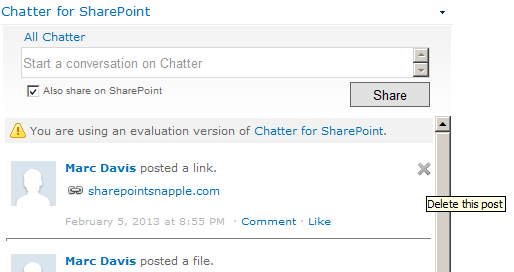
As you hover over the right-corner of a post or comment, a delete icon will appear if you have permission to delete the item. After confirming you want the item deleted it will be immediately removed from the feed.

Users can now respond to polls created on Chatter right from the web part. You can vote or change your vote and view or refresh the poll results. Note – polls still must be created from SalesForce Chatter for now.

The web part has a completely new and intuitive navigation system. Clicking the feed control now displays a context-menu which allows you to select the feed to view or to refresh the current feed. When selecting Groups for the first time, the web part will load and cache all of the selectable groups and present them as a drop-down within the menu:

Finally – we have a number of ‘fit-and-finish’ improvements to the UI, including doctype attachment icons that leverage the SharePoint DOCICONS cache:

As you can see – a lot of new and useful functionality is in the works. I’m also considering a PowerShell script or GUI Setup to further simplify the installation. Also in the pipeline, but not in the 1.4 release, is support for language localization (RESX), @mentions and post-targeting.

So look for the new version shortly here on the blog and keep those suggestions coming in. I appreciate the support – and for those that haven’t bought the web part yet – what are you waiting for? Seriously – if your must-have feature isn’t in the solution yet, I can fix that. J

Disclaimer: Screenshots above are from the 2010 version and are still in progress. Final features and appearance subject to change, yadda yadda.