Chatter for SharePoint: Version 1.1 Released!

Hi Everyone – Late night here at SharePoint Snapple but for a good cause. Version 1.1 of the Chatter for SharePoint solution just went live on the blog. You can download the updated bits and documentation right now.

As promised – this version contains the much anticipated SharePoint Foundation support and the new Federated Search with Chatter feature. V1.1 also includes several usability fixes and improvements. Be sure to check out the All New User Guide – every section has been updated with new information, tutorials and screen shots to make your experience with the solution the best it can be. I’m also finishing a video that I’ll post to the blog shortly which demonstrates the installation, configuration and use of the solution.

So please go download and install the new version while I get some much needed sleep. Please continue to send me your feedback and suggestions. I hope you enjoy using the new Chatter for SharePoint!

Chatter for SharePoint: Foundation Support

Hi Everyone – Thanks to all of you who have purchased the web part this week – I’m amazed at the interest and excitement there is in the community to integrate Chatter with SharePoint.

I am pleased to announce that Version 1.1 of the Chatter for SharePoint solution will be released shortly and includes 2 major enhancements:

  1. SharePoint Foundation 2010 support
  2. Federated Search with Chatter (SharePoint 2010 Standard/Enterprise only)

By far the most requested enhancement has been the Foundation support. This opens the solution up to the entire SharePoint 2010 community and I am thrilled to offer it. When running on Foundation, the search-integration with Chatter will not be available since the Search Server Services are not present.

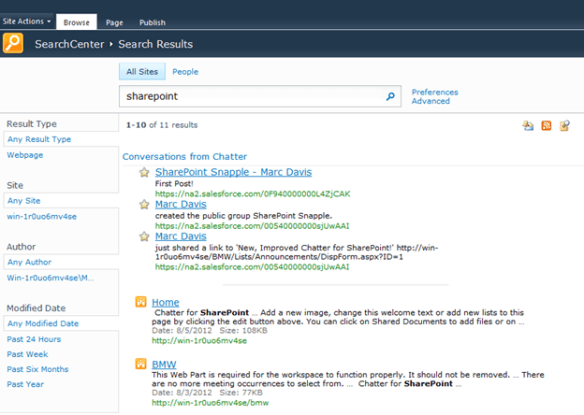
Speaking of Federated Search – it’s ready and will be in the V1.1 release. The package includes a utility to automatically install and configure the search connector in your environment. All you will need to do is add/update the existing Federated Results web part on your Search Center results page.

As always, existing licensed users can upgrade to this new version by downloading the package, retracting the old WSP, and deploying the new one. Detailed instructions will be included with the solution.

I’m looking to release the new version sometime this weekend; still have some regression testing to do and code cleanup. Thanks for your continued suggestions and support. Have a great weekend!

Chatter for SharePoint: Search

Busy weekend here at SharePoint Snapple! First we release a ton of updates on Friday and now by late Sunday night (ok, technically early Monday morning) I have some more goodness to show you. I’ve been working on integrating Chatter conversations into SharePoint Server’s search and now have some details to share.

I’ve built an OpenSearch-compliant web service that queries the All Company feed, parses the JSON, and renders an ATOM/RSS feed that is compatible with the OpenSearch provider in SharePoint 2010. The service can either pass the user’s token to SalesForce or use a ReadOnly API user to make the call. Links in the returned stream open to the related feed within SalesForce.

I’ve felt that being able to integrate searching conversations into SharePoint is a must-have in this solution and I am excited that it is nearly complete. I will have a lot more details to share once I finish the design – but the early work is very promising.

Chatter for SharePoint – Updated Features

Hi everyone! I wanted to share with you the really awesome enhancements to the Chatter for SharePoint solution. Your feedback has been terrific and has helped make this solution even more useful. Version 1.0.0.6 will be posted shortly on the blog is now available! Get it right here. Existing users can retract and add the new solution to get all of the updated features.

So – what’s new?

SharePoint Ribbon Integration

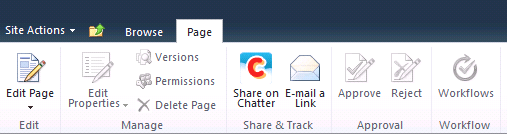
You can now share pages, list items, and documents within SharePoint from the ribbon! For sharing pages, click on the ‘Page’ tab and you’ll see a Chatter icon in the ‘Share & Track’ grouping:
For Lists and Libraries, the Share on Chatter link will appear in the ‘Share & Track’ group in the Items/Documents ribbon:
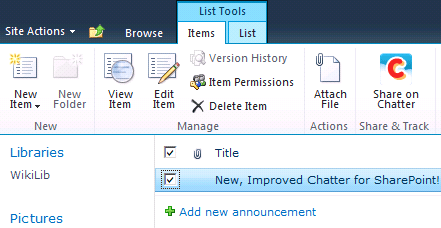
When clicked, a modal window will appear with the selected object to share and a space for your comments:

And the result is visible in the Chatter feed:

Browsing within the Chatter Web Part

Prior to this version if you clicked on a user or group name within the feed window it would open a new browser session to SalesForce Chatter. Now, you can browse and post across groups and users within the web part!

A new breadcrumb trail shows your current feed location and gives you one-click access to the All Chatter feed. Also new is the ability to refresh the feed by clicking on the feed in the breadcrumb trail.

New Progress Animations

When you post or update feed items you now get progress indictors while the server is processing the request:

The animations will appear for the following actions: refreshing the feed, posts, like/unlike, and comments. The animations also appear relative to the item being updated – cool.

Web Application Settings

The solution now stores default properties in the web.config AppSettings. This was necessary to support the Ribbon Integration and allows any instance of the web part to use the configuration and license information so you have less to configure when adding the web part to other sites/pages.

Other Stuff

This version also includes a bunch of fixes and tweaks to the user interface, including:

  • Fixed issue where posting to group was being sent to the All Company feed
  • Fixed issue where jQuery undefined message would appear on some browsers
  • Fixed issue where posts on user feeds would appear with a group icon in the All Company feed
  • Fixed alert banner colors
  • Tweaked feed parent/actor display properties
  • Updated some help text and debug messages

Still in Progress

I am still working on the SharePoint Foundation version of the solution as well as Search integration — wanted to get the usability improvements done first. Look for these and more updates in a future release.

Thanks to everyone who contributed ideas – helps me make better solutions for you.

Coming Soon: Yammer for SharePoint

Just a quick update on some of the projects I am currently working on for SharePoint Snapple. First, I am pleased to announce that I will be releasing a new web part to integrate Yammer into SharePoint. The web part will have identical functionality as its Chatter counterpart. In addition, both solutions are getting some new features, including SharePoint Ribbon integration and (by popular request) support for SharePoint Foundation. Look for both of these updated solutions in the coming weeks.

SalesForce releases Chatter Web Parts

A few days ago SalesForce finally released their version (technically, designed by Persistent) of the Chatter Web Part for SharePoint. I had an opportunity to review this solution last year – and it was this project that compelled me to write my own Chatter Web Part. Why you ask? First, it is heavily SalesForce branded (understandable) which did not work well with our branding. Functionally, it had (and continues to have) a dependency on SSL for your web applications. It was never clear to me why this was a requirement. Sure, if my site was publicly accessible I would want my feed to be secure. But if you have an intranet, you may not be using SSL. Or what if you offload SSL and pass HTTP to your front-ends? Plus, the backend server is making the secure call to SalesForce for you – and that doesn’t require SSL on the web application. Then, it was the overly complex installation – plus multiple web parts for different sites – which in my opinion made it more difficult to deploy and quickly use.

Yes, this web part is free on the AppExchange. I think my version is a lot easier to install, configure, and use. I encourage you to try both and make your own choice.

SharePoint Connections: Day 3

Jumping around a bit today – going to attend some of the other tracks in SQL, HTML5, and Visual Studio. Look for me in CJQ201, VFN04, and VFN03. Hope everyone is having a great time. Lots of hits on the blog this week – appreciate the comments and look for me at the conference – will talk all things SharePoint.