Chatter for SharePoint: Foundation Support

Hi Everyone – Thanks to all of you who have purchased the web part this week – I’m amazed at the interest and excitement there is in the community to integrate Chatter with SharePoint.

I am pleased to announce that Version 1.1 of the Chatter for SharePoint solution will be released shortly and includes 2 major enhancements:

  1. SharePoint Foundation 2010 support
  2. Federated Search with Chatter (SharePoint 2010 Standard/Enterprise only)

By far the most requested enhancement has been the Foundation support. This opens the solution up to the entire SharePoint 2010 community and I am thrilled to offer it. When running on Foundation, the search-integration with Chatter will not be available since the Search Server Services are not present.

Speaking of Federated Search – it’s ready and will be in the V1.1 release. The package includes a utility to automatically install and configure the search connector in your environment. All you will need to do is add/update the existing Federated Results web part on your Search Center results page.

As always, existing licensed users can upgrade to this new version by downloading the package, retracting the old WSP, and deploying the new one. Detailed instructions will be included with the solution.

I’m looking to release the new version sometime this weekend; still have some regression testing to do and code cleanup. Thanks for your continued suggestions and support. Have a great weekend!

Coming Soon: Yammer for SharePoint

Just a quick update on some of the projects I am currently working on for SharePoint Snapple. First, I am pleased to announce that I will be releasing a new web part to integrate Yammer into SharePoint. The web part will have identical functionality as its Chatter counterpart. In addition, both solutions are getting some new features, including SharePoint Ribbon integration and (by popular request) support for SharePoint Foundation. Look for both of these updated solutions in the coming weeks.

SalesForce releases Chatter Web Parts

A few days ago SalesForce finally released their version (technically, designed by Persistent) of the Chatter Web Part for SharePoint. I had an opportunity to review this solution last year – and it was this project that compelled me to write my own Chatter Web Part. Why you ask? First, it is heavily SalesForce branded (understandable) which did not work well with our branding. Functionally, it had (and continues to have) a dependency on SSL for your web applications. It was never clear to me why this was a requirement. Sure, if my site was publicly accessible I would want my feed to be secure. But if you have an intranet, you may not be using SSL. Or what if you offload SSL and pass HTTP to your front-ends? Plus, the backend server is making the secure call to SalesForce for you – and that doesn’t require SSL on the web application. Then, it was the overly complex installation – plus multiple web parts for different sites – which in my opinion made it more difficult to deploy and quickly use.

Yes, this web part is free on the AppExchange. I think my version is a lot easier to install, configure, and use. I encourage you to try both and make your own choice.

SalesForce Chatter Web Part

You asked for it – the Chatter for SharePoint web part is now available! Download it right now and try it out in your SharePoint farm. The evaluation version is good for 15 days and will demonstrate all of the features of the web part – with only the minimum of nagging and annoying restrictions.

https://marcrdavis.wordpress.com/chatter-for-sharepoint/


SalesForce Chatter Integration to SharePoint – Part 2

UPDATE: Click here to download the Chatter for SharePoint solution.

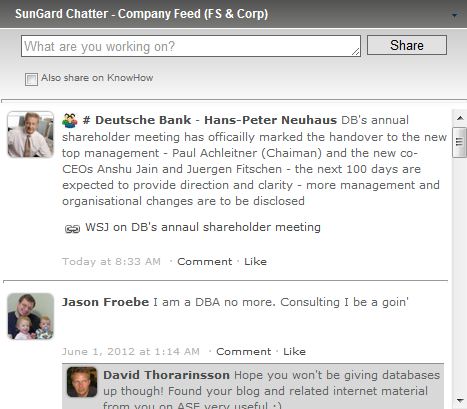
So we just finished the second phase of our SalesForce Chatter integration efforts – the displaying of feeds and basic wall-functionality: Posts, Comments, Groups, Tags, and Likes.

Here’s what it looks like:


I described the basic workings of the web part in an earlier article (https://marcrdavis.wordpress.com/2012/02/11/salesforce-chatter-integration-to-sharepoint/) so please check that out for the details. I think it worked out very well. We added the ability to cross-post to your SharePoint profile when updating Chatter, nice. We also added properties to control the number of feed items returned, the cache and refresh timeouts, and options to produce debugging information per-user so we can trace issues in production.

Users who have authorized our intranet on their Chatter profile get the full experience above – they can post, like (or unlike), and comment on items. If they have not done the authorization step yet (or it was revoked), then users will get a read-only view of the All Company feed (which is done by adding a SalesForce API-enabled account in the web part configuration). Read-Only users are invited to authorize the app so they can get the full experience:

Clicking the link starts the authorization process:

The biggest challenge we had with the design was the Chatter API rate-limit of 200 requests per user, per application, per hour. We had to get creative with caching so we would not run over the limit – especially for the read-only view.

The goal here was not to reproduce Chatter or all of the Chatter features – but rather bring the feed data and the basic social experience into our SharePoint Intranet. Links, hashtags, and attachments are redirected to a new browser window that opens to the full Chatter web application. SalesForce has been working on a version of this web part for some time – but it is still in beta and not widely available. The version we tested also had a requirement of SSL on the SharePoint front-end servers. Since we offload SSL on our load-balancers, we could not use their web part properly. Ours does use SSL to talk to SalesForce (so the feed is secure) but we don’t need to have SSL on the web applications. Our web part is also not encumbered by the SalesForce branding – so it fits in perfectly.

The next phase will continue to integrate the platforms further, with indexing Chatter so it can be returned in SharePoint search results. We may also look to embed the wall-experience in the user’s profile page.

That’s it for now – look for more on this soon. Be sure to look for my tweets and blog updates from the SharePoint Connections Conference in March. Take care.

SalesForce Chatter Integration to SharePoint

UPDATE: Click here to download the Chatter for SharePoint solution.

Hi everyone – sorry it’s been awhile between posts but got really busy at the end of the year. This article continues my series on SunGard’s corporate Intranet and the custom development we’ve done. As we were designing the branding we had some challenges around where to put some of the native controls and ribbon elements – especially two in particular: ‘Tags and Notes’, and ‘Like’. Since we effectively hid the ‘Browse’ tab, those default ribbon icons were MIA – but we didn’t want to lose that functionality. Another tab in the ribbon seemed the most logical place, and would serve as way to integrate other social aspects into SharePoint.

Being new to working with the SharePoint Ribbon, I looked on the net for examples – and found a great one on CodePlex: http://socialsharepoint.codeplex.com/ . This project helped me create the new ‘Share’ tab on our intranet and relocate the ‘Tags and Notes’ and ‘Like’ buttons. The tab also contains other sharing options, like ‘Email’, ‘RSS’, and ‘SalesForce Chatter’.
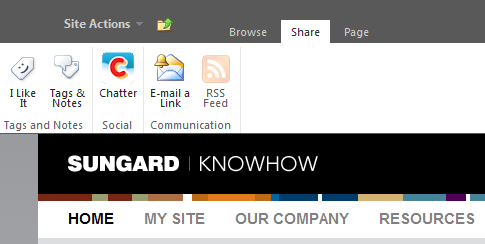
Above: The Share tab open on the ribbon.

When SunGard standardized on Chatter as their social platform, the focus became integrating Chatter into SharePoint as seamlessly as possible. We’ve approached this process in stages. The first stage was basic integration – common authentication, status updates, and shaing pages, documents, and list items. The first phase was achieved with the Share on Chatter feature in the ribbon, and a custom web part for posting status updates (detailed later in this post).
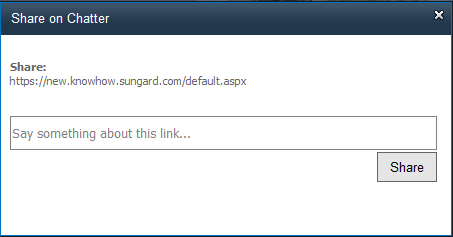
Above: Clicking on the Chatter ribbon icon opens a modal window with the selected page, item, or document as an embedded link. Users can add comments and share the item on Chatter.

The Ribbon enhancement and the web part use OAuth and the Chatter REST APIs to communicate with SalesForce. The user’s token and secrets are stored in hidden fields within their profile. Once they authorize the KnowHow Application on Chatter once, they can use any of the Chatter integration features we design.

Users can also post status updates simultaneously to both SharePoint and Chatter by means of our Status Update Web Part:
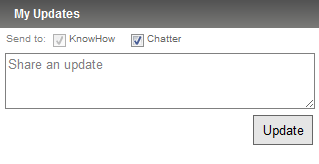
This web part is placed in everyone’s Sidebar (see: https://marcrdavis.wordpress.com/2011/09/27/persistent-personalized-content-in-sharepoint/ for details on the Sidebar) making it quick and easy to post updates. The user’s posts are sent to their SharePoint profile as well as posted on their Chatter feed.

The second stage, which is underway now, involves bringing the many different feeds in Chatter directly into SharePoint. Doing this has proved challenging, since only this weekend has the Chatter v24 API been rolled out in our Org. Our Feed web part will leverage the above common authentication and will allow site owners to place feeds directly on their sites. The web part uses the REST API to pull down feed data as a JSON array (http://json.codeplex.com/) and then parses that data into feed-items and their components. Then, with some CSS and markup, we format that data into a wall view. Properties in the web part control what feed is shown (personal, company, or group) and options for supplying default credentials for Chatter, which can be used to authenticate users that do not have a Chatter profile or have not authorized the site on their profile yet. In that mode, all feeds are read-only. The web part also leverages Ajax to provide dynamic updating of the feeds without the need to repost the entire page

Our Status Update web part will then get an overhaul – adding the user’s personal feed view right in their Sidebar.

I personally would have loved to see true threaded discussions, micro-blogging, and a wall-like interface in SharePoint natively (maybe v15) – would have saved me a lot of work. But we’ve been able to do some really cool things with these two platforms and while getting them to place nice is a challenge, our end users really enjoy the experience and this helps us drive more traffic to SharePoint now that they can seamlessly collaborate on our external social platform.

Up next – our take on Exchange and Outlook integration with SharePoint.